
Free Trial
Home Features Industries Pricing About Blog Help Contact
Home / Guide
Buyer's guide

Best CRM with Meta Conversion API (CAPI)

Updated September 20268 min read

If your leads come from Meta (Facebook and Instagram) ads, you've probably noticed your cost per lead creeping up while your actual sales stay flat. There's a good chance the problem isn't your ad creative at all — it's that Meta has no idea which of your leads turned into real customers. That's exactly the gap the Conversion API is built to close, and it's why the CRM you pick matters more than most people realise.

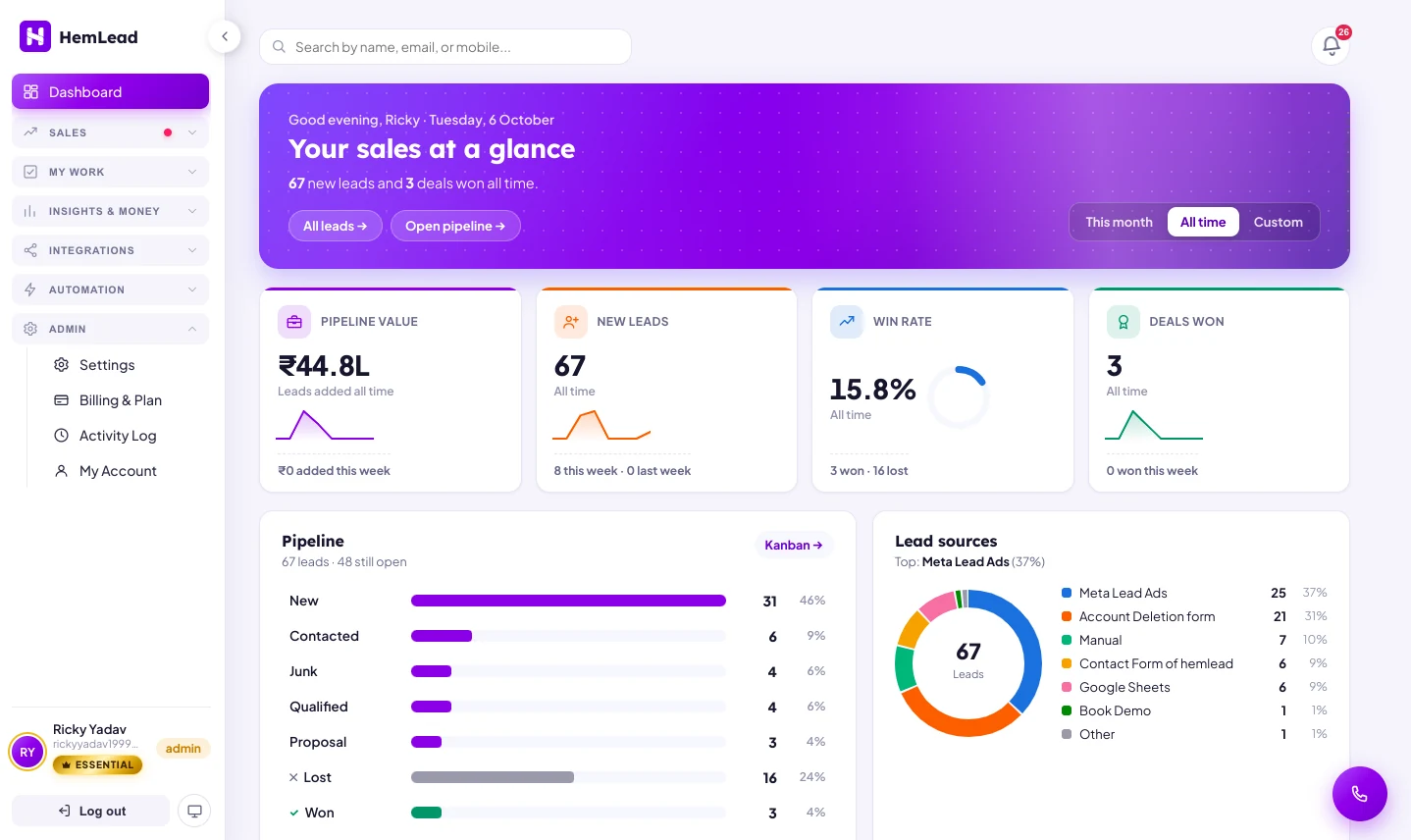
HemLead CRM dashboard showing pipeline stages, win rate and leads coming in from Meta Lead Ads

Here's a story that plays out in thousands of businesses every month. A lead fills out a Meta Instant Form. Meta logs it as a "lead" event and moves on — it has no way of knowing what happened next. Maybe a sales rep called within five minutes and closed the deal. Maybe the lead was fake, or a competitor's spam, or someone who was never going to buy. To Meta, all three look exactly the same: one form fill. So the algorithm keeps sending you more people who look like whoever filled out that form — good, bad, or fake — because it was never told which leads were actually worth chasing.

That's the problem the Meta Conversion API, usually shortened to CAPI, was built to solve. And it's why "best CRM with Meta Conversion API" has become one of the most common searches from businesses that advertise on Facebook and Instagram — because the CRM you choose decides whether CAPI actually works for you, or just sits there unused as a checkbox on a features page.

On this page
  1. What Meta Conversion API (CAPI) actually is
  2. Why the Meta pixel alone isn't enough anymore
  3. What to look for in a CRM with CAPI
  4. How CAPI sync should work, step by step
  5. CRM with CAPI vs. CRM without it
  6. Common questions

What Meta Conversion API (CAPI) actually is

In plain terms: CAPI is a way for your own server — not the visitor's browser — to tell Meta directly when something important happens. A lead qualifies. A deal closes. A customer pays. Instead of Meta guessing at outcomes from browser signals, your CRM can hand it the real answer, straight from your sales pipeline.

This matters because Meta's ad system doesn't just deliver ads — it learns from every signal you send back. Every event tells the algorithm "show more ads to people who look like this," or "stop showing ads to people who look like that." A CRM with proper CAPI sync means every stage a lead moves through in your pipeline — new, contacted, qualified, junk, won — becomes a signal Meta can actually learn from, not just the one-time "form submitted" event it already had.

Think of it this way: the pixel tells Meta someone knocked on your door. CAPI tells Meta whether you actually sold them something.

Why the Meta pixel alone isn't enough anymore

For years, the Meta pixel — a small piece of tracking code that runs in the visitor's browser — was the whole story. It still matters, but three things have quietly broken how much it can see on its own:

Ad blockers and privacy browsers silently stop the pixel from firing at all, on a growing share of visitors — so those conversions simply never get counted.
iOS privacy settings (App Tracking Transparency) cut off a large chunk of browser-level tracking on iPhones, which is where a big share of ad clicks come from.
The pixel only ever sees browser events — it has no way of knowing that a lead who filled a form on Monday became a paying customer three weeks later, because that decision was made over a phone call, not on your website.

CAPI fixes all three at once, because it doesn't rely on the browser at all — it sends the event straight from your server (in this case, your CRM) to Meta. That's more reliable, survives privacy restrictions, and can report events that happen long after the original ad click, like a lead finally converting after a week of follow-up calls.

What to look for in a CRM with CAPI

Plenty of CRMs will tell you they "support" Meta CAPI. In practice, that claim covers a wide range — from a genuinely automatic, no-code sync, all the way down to "technically possible if you hire a developer." Here's what actually separates a CRM that's good at CAPI from one that just mentions it:

CAPI is included, not a paid add-on. If the ability to send conversion events back to Meta is locked behind a premium tier, you're paying extra just to get value from the ad spend you already have.
No developer needed to connect it. The whole point of CAPI is to help a small sales team, not to hand them a new integration project. Setup should be a form you fill in once, not an API document you hand to an engineer.
Events fire automatically on pipeline stage changes. The moment a rep marks a lead "Qualified" or "Won," that should trigger the event — not require someone to remember to click a separate "sync to Meta" button.
Customer data is hashed before it's sent. Meta requires personal details like email and phone number to be hashed (SHA-256) before they're used for CAPI matching — a CRM that skips this, or makes you configure it yourself, is a real privacy risk.
It's paired with proper lead capture. CAPI sync is only as good as the leads feeding it — a CRM that captures Meta Instant Form leads directly, with no manual CSV export step, keeps the whole loop closed from click to conversion.

How CAPI sync should work, step by step

Stripped of the technical detail, a well-built CAPI integration inside a CRM follows the same simple loop every time:

Lead clicks your adMeta records the click
→
Fills Instant FormCaptured straight into your CRM
→
Rep works the leadPipeline stage updates
→
Stage change fires CAPIHashed, sent server-side
→
Meta learnsOptimises toward real buyers

The part that most guides skip is the last step — this isn't a one-time setup you configure and forget. Every single stage change becomes a fresh signal. Over weeks and months, that steady stream of real outcome data is what actually teaches Meta's algorithm the difference between someone who fills forms for fun and someone who's ready to buy — which, in practice, is what brings your cost per lead down over time instead of letting it drift upward.
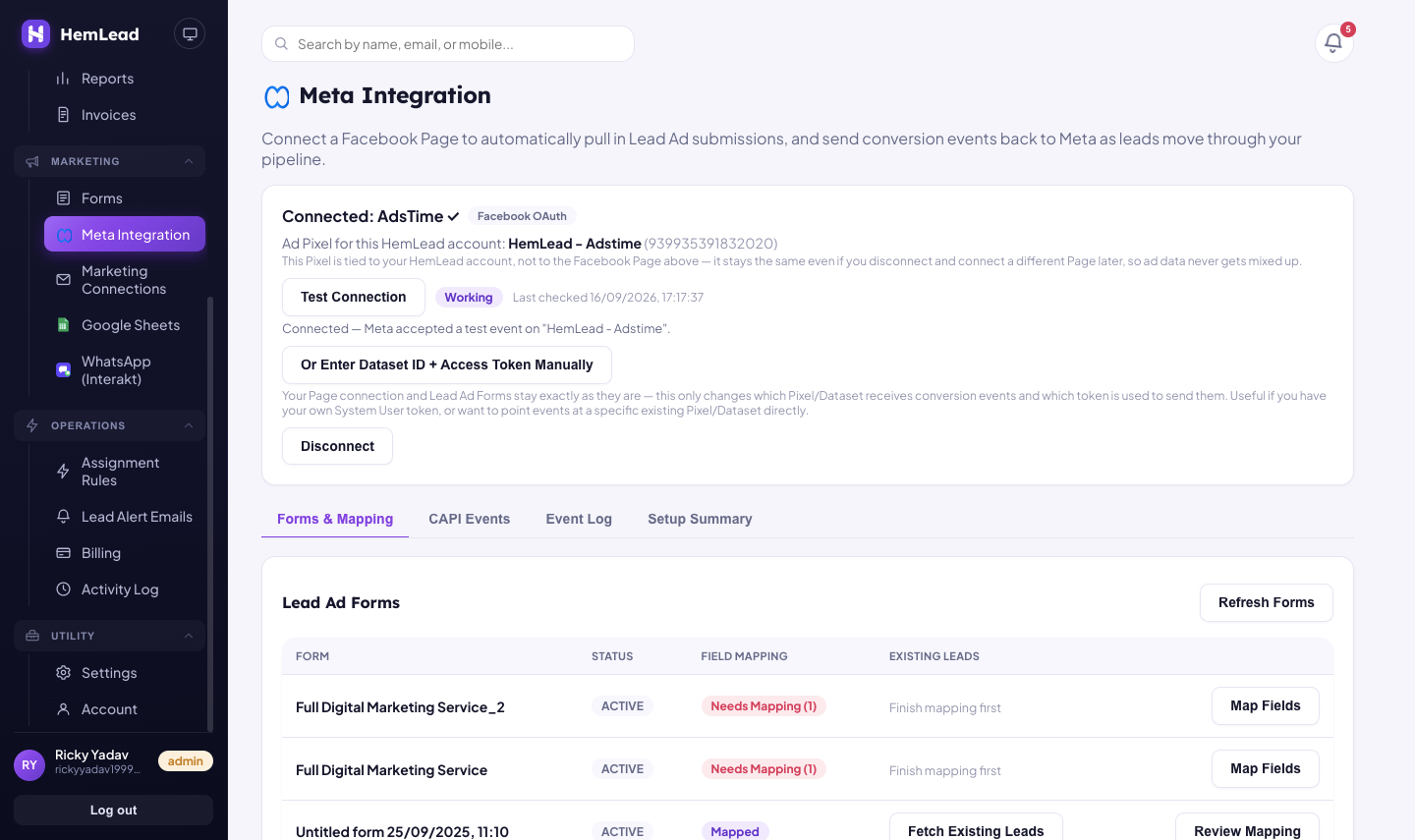
HemLead's Meta Integration page, showing a connected Meta ad account, a working CAPI test connection, and Lead Ad forms mapped for automatic syncing

This is the actual Meta Integration screen inside HemLead — connect once, and every pipeline stage change syncs from here automatically.

CRM with CAPI vs. CRM without it

To make the difference concrete, here's what the same lead's journey looks like with each type of setup:

CRM without CAPICRM built for CAPI (HemLead)
What Meta seesOnly that a form was filledEvery stage — qualified, junk, won — as it happens
Setup effortNeeds a developer or third-party toolConfigured once, no code, around fifteen minutes
Data privacyVaries — hashing often left to youEmail & phone hashed with SHA-256 automatically
Ongoing effortManual export or a separate sync stepAutomatic — fires on every pipeline stage change
Effect on ad costCost per lead tends to drift up over timeAlgorithm learns from real outcomes, not just clicks

HemLead includes Meta CAPI sync on every plan, including the free trial — it's not held back for a higher tier. The Essential plan starts at ₹1,499 a month, GST inclusive, and the 14-day trial doesn't ask for a card up front. You can see the full breakdown on the pricing page.

A quick honest note

CAPI improves ad performance over time — it's not a switch that instantly halves your cost per lead the day you turn it on. It works by feeding Meta's algorithm better data, and algorithms need a real stream of events before they learn anything useful. Expect the benefit to show up as a gradual improvement over a few weeks of active use, not an overnight change.

HemLead team
Written by the HemLead team
We build CRM software for sales teams running Meta ads, with Meta CAPI sync built in from day one — for teams of any size.

See Meta CAPI sync working on your own leads

14-day free trial, no card required. Or book a 20-minute walkthrough on your actual Meta ad account.

Common questions

Before you pick one

What is the best CRM with Meta Conversion API (CAPI) integration?
Look for a CRM where CAPI sync is a built-in feature, not a paid add-on or a developer project — one that sends events straight from your pipeline stages (qualified, converted, junk) back to Meta automatically. HemLead includes CAPI sync on every plan, with events firing the moment a lead's stage changes, no code required.
What does Meta Conversion API (CAPI) actually do?
CAPI lets your server send conversion events (like a lead qualifying or a sale closing) directly to Meta, instead of relying only on the browser pixel. It gives Meta's ad algorithm real outcome data to optimise toward, rather than just clicks and form fills.
Do I need a developer to set up Meta CAPI with a CRM?
Not if the CRM is built for it. With HemLead, CAPI is connected once during onboarding — roughly fifteen minutes — and every pipeline stage change syncs automatically after that, with no ongoing code to maintain.
Is customer data safe when it's sent to Meta through CAPI?
It should be. HemLead hashes email addresses and phone numbers with SHA-256 before anything is sent to Meta, which is the standard Meta requires for CAPI events — so Meta never sees the raw contact details, only a hashed match key.
Why is CAPI better than just using the Meta pixel?
The pixel only sees what happens in the browser, and loses accuracy to ad blockers, iOS privacy settings, and cookie restrictions. CAPI sends the same events from your server instead, so tracking survives all of that — and it can report deeper events the pixel never sees at all, like a lead turning into a paying customer three weeks later.