Every sales team has had this moment. A good lead comes in. Two people think the other one called. Or nobody does, because it came in late and everyone assumed someone else would take it. By the time anyone picks up the phone, the buyer has already spoken to a competitor.
The fix isn't working harder. It's deciding once who should get which lead, and letting your CRM do it every time.
The 3 ways to assign leads
There are only three ways to decide who gets a lead. Most growing teams end up using the last two together.
By hand
A manager reads each lead and passes it on.
- Full control
- Slow at night and on weekends
- Breaks when the manager is busy
Round-robin
Leads go to a group of people in turn.
- Instant and fair
- Nobody has to decide
- Treats every lead the same
Rules
Lead details decide the owner, with round-robin inside.
- Right person, right away
- Big leads go to your best closer
- Still fair inside each group
Round-robin, explained simply
Think of dealing cards. Lead 1 goes to Sara, lead 2 to Vikram, lead 3 to Kshitij, then back to Sara. Everyone gets a fair share, and no lead sits waiting for someone to "pick it up".
Round-robin is perfect when every salesperson can handle every lead equally well. It falls short when some leads clearly belong to someone: a ₹1.2 Cr enquiry, a lead in a city only one person covers, or a buyer asking about a project another salesperson runs. That's where rules come in.
Rules: send each lead to the right person
A rule is just a simple sentence: "If the lead looks like this, give it to that person (or that group)." In HemLead, a rule checks the lead's details, like its source, value, stage, tags, lead list, or your own custom fields such as budget range, then does one of two things:
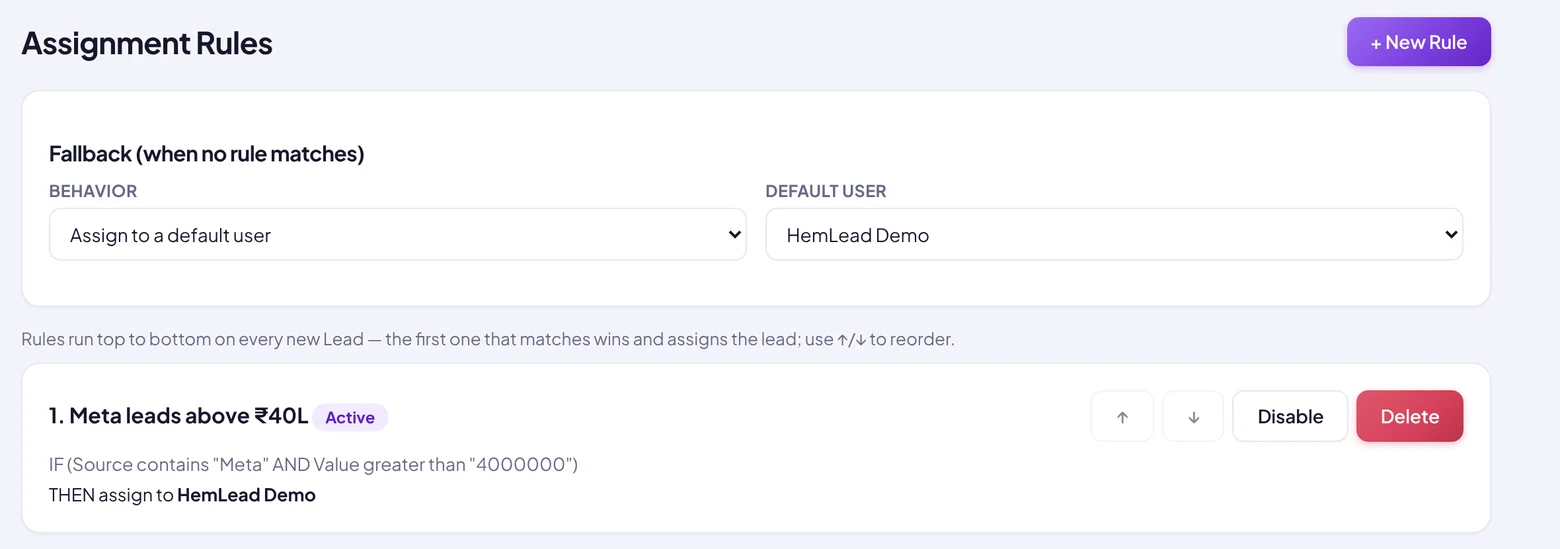
Here's what a small real estate team's rules could look like:
Meta and value is greater than ₹40,00,00099acresTry it: which rule catches this lead?
Pick a lead below and see who gets it with the rules above. This is just a demo on this page; nothing is sent anywhere.
Try a rule
Change the source or the budget.
Rule ideas for your industry
Not in real estate? The same idea works anywhere you sell on enquiries. A few starting points:
Tip: if you want everyone in a team to share all leads in turn, make one rule like "source is not empty" with the action Round-robin. Every new lead has a source, so it catches them all.
Set it up in HemLead (with video)
Watch the whole thing in under a minute: one rule is created, and a new Meta lead is assigned the moment it arrives.
Step by step
- Open Automation → Assignment Rules in HemLead's left menu.
- Set your fallback first. Choose "Leave unassigned" or "Assign to a default user". This is what happens when no rule matches.
- Click + New Rule and give it a name you'll recognise, like "Meta leads above ₹40L".
- Add conditions. Pick a field (source, value, tag, your custom fields…), how to compare (contains, greater than, is empty…) and a value. Use AND when every condition must be true, OR when any one is enough.
- Choose the action: assign to one person, or round-robin across a group.
- Click Create Rule, then use the ↑ ↓ arrows to put your most specific rules on top.
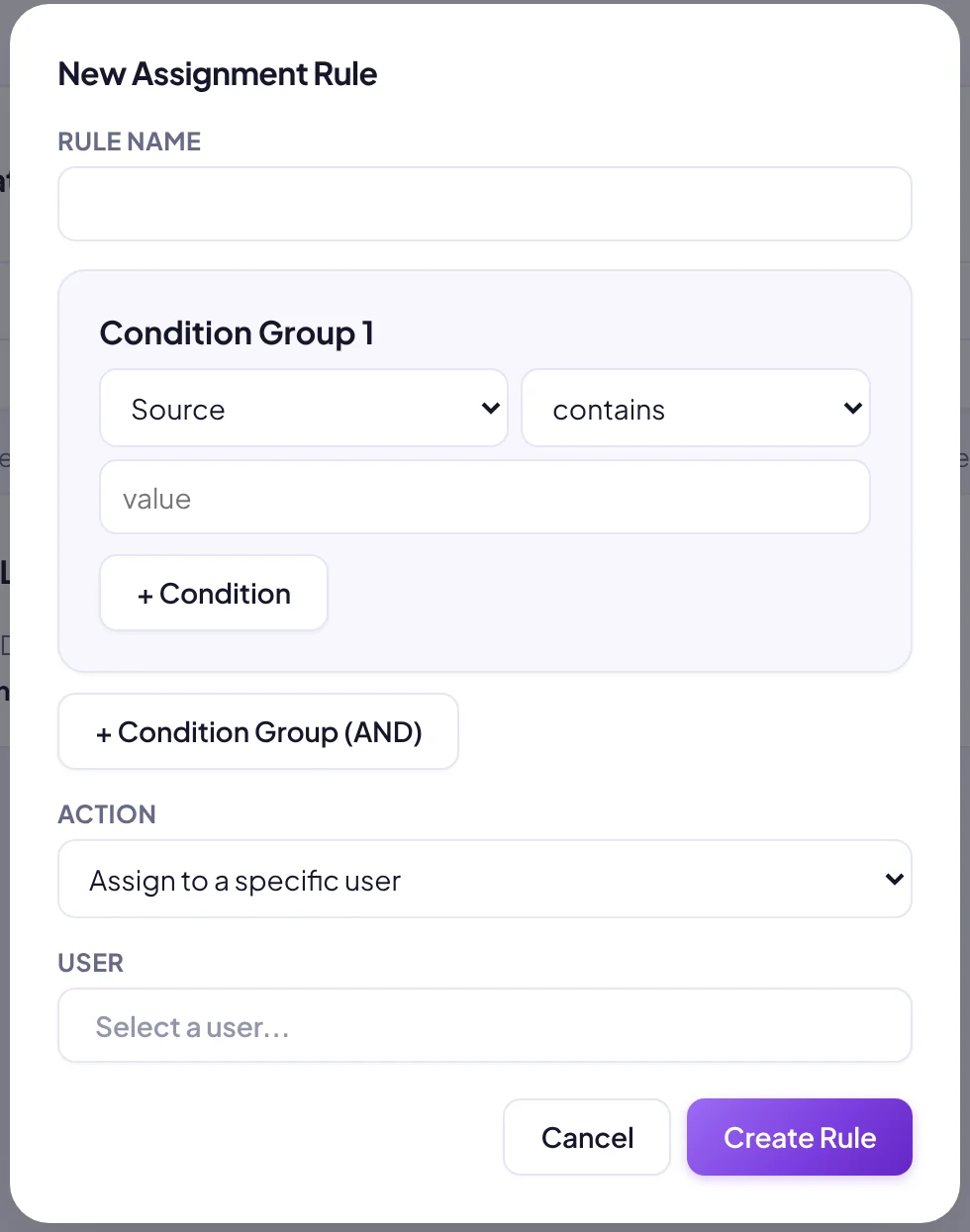
The New Assignment Rule window: a name, your conditions, and who gets the lead.
Once rules are on, two more things make them work even better:
5 mistakes to avoid
1. No fallback
A lead that matches no rule shouldn't vanish. Always set the fallback, even if it's just "assign to the sales manager".
2. A broad rule on top
If "source is not empty → round-robin" sits above your big-budget rule, it catches everything first. Specific rules go on top, catch-all rules at the bottom.
3. Too many rules on day one
Start with two or three. Add more only when you see a real pattern, like one source that always needs a specialist.
4. Forgetting people on leave
If someone is away, take them out of the round-robin group or Disable their rule for a few days. Leads should never wait in an empty inbox.
5. Assigning, but not following up
A rule decides the owner; it doesn't make the call. Pair it with alerts and task reminders, and check the pipeline for leads that are still sitting in "New".